Commerce 365 for Magento uses AL's Interface + Enum pattern for inventory calculation. This allows you to plug in your own custom inventory calculation strategy from a per tenant extension (PTE).
The Commerce 365 for Magento core app ships with three built-in methods (Magento Reservations Enabled, Magento Reservations Disabled, and Disabled). You can add your own by creating two AL objects in your extension: a codeunit that implements the interface, and an enum extension that registers it. Of course you can create and register more than one. But typically, per client, you need one.
Once registered, you can go to Administration > Setup > Catalog, and select your new interface implementation there.
When changing to the new value, please make sure to also execute Actions > Recalculate Inventory, to make sure all inventory values are recalculated based on your new formulas.
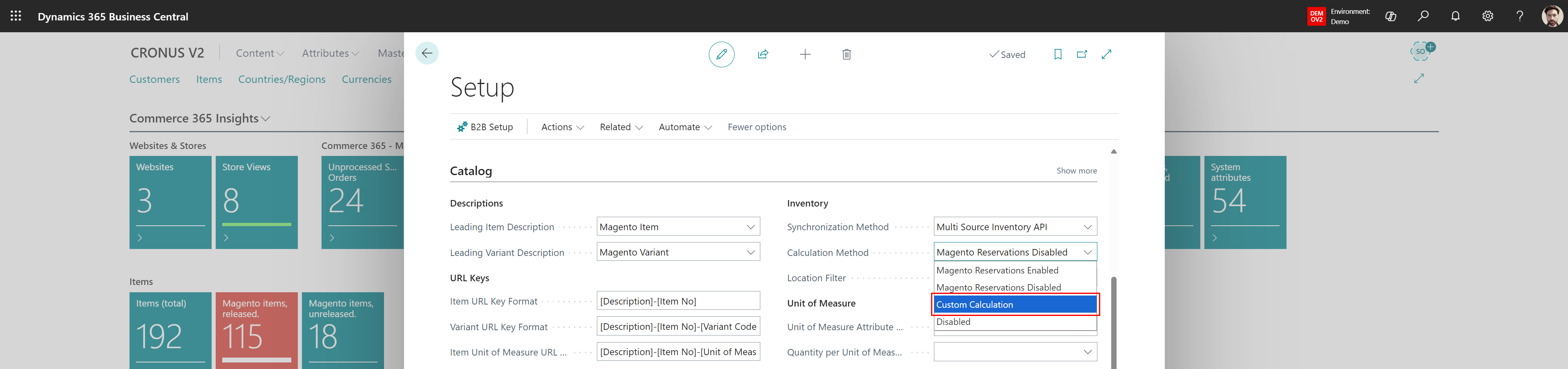
With the new enum value selected, the core app resolves the enum value to your codeunit and calls Calculate(). No event subscribers required.
Your codeunit must implement this interface:
interface "NC365 Inventory Calc. Provider"
{
    Access = Public;
    procedure Calculate(LocationCode: Code[10]; ItemNo: Code[20]; VariantCode: Code[10]): Decimal
}
Where:
- LocationCode - The warehouse location code.
- ItemNo -The item number to calculate inventory for.
- VariantCode - The item variant code. Empty string if no variant.
You need two objects in your extension.
Create a codeunit that implements NC365 Inventory Calc. Provider and contains your custom inventory logic, like the example below:
codeunit 50100 "My Custom Inventory Calc." implements "NC365 Inventory Calc. Provider"
{
    Access = Internal;


    internal procedure Calculate(LocationCode: Code[10]; ItemNo: Code[20]; VariantCode: Code[10]): Decimal
    var
        Item: Record Item;
    begin
        // Your custom inventory calculation logic here.
        // Must return the available inventory as a Decimal.

        if not Item.Get(ItemNo) then
            exit(0);

        if LocationCode <> '' then
            Item.SetFilter("Location Filter", LocationCode);
        if VariantCode <> '' then
            Item.SetFilter("Variant Filter", VariantCode);

        Item.CalcFields(Inventory);
        exit(Item.Inventory);
    end;
}
The procedure signature must match exactly: same parameter names, types, and return type.
Create an enum extension that extends NC365 Inventory Calc. Method and maps your new value to your codeunit:
enumextension 50100 "Custom Calculation Method" extends "NC365 Inventory Calc. Method"
{
    value(50100; "Custom Calculation")
    {
        Caption = 'Custom Calculation';
        Implementation = "NC365 Inventory Calc. Provider" = "My Custom Inventory Calc.";
    }
}
After installing your extension, Custom Calculation appears in the Inventory Calculation Method dropdown on the Commerce 365 Setup page. When selected, the core app calls your Calculate() procedure for all inventory calculations.
Important Notes
- Object ID range: Use your own extension's assigned object range for both the codeunit ID and the enum extension value ID (e.g. 50100).
- App dependency: Your extension must declare a dependency on Commerce 365 for Magento in app.json so the interface and enum are available.
- Rounding convention: The built-in methods round down to whole numbers (Round(Inventory, 1, '<')) unless the item is flagged as Qty Uses Decimals. Consider following this convention for consistency.
- Additional triggers may be needed: If your calculation logic depends on custom tables, you might need to add additional subscribers to your extension, and then use the NC365 Inventory API to trigger a recalculation. In turn the calculation mechanism will then call your calculation codeunit.
Was this article helpful?
That’s Great!
Thank you for your feedback
Sorry! We couldn't be helpful
Thank you for your feedback
Feedback sent
We appreciate your effort and will try to fix the article