Commerce 365 for Magento uses AL's Interface + Enum pattern for item attribute value mapping. This allows you to plug in your own data mapping logic from a per tenant extension (PTE).
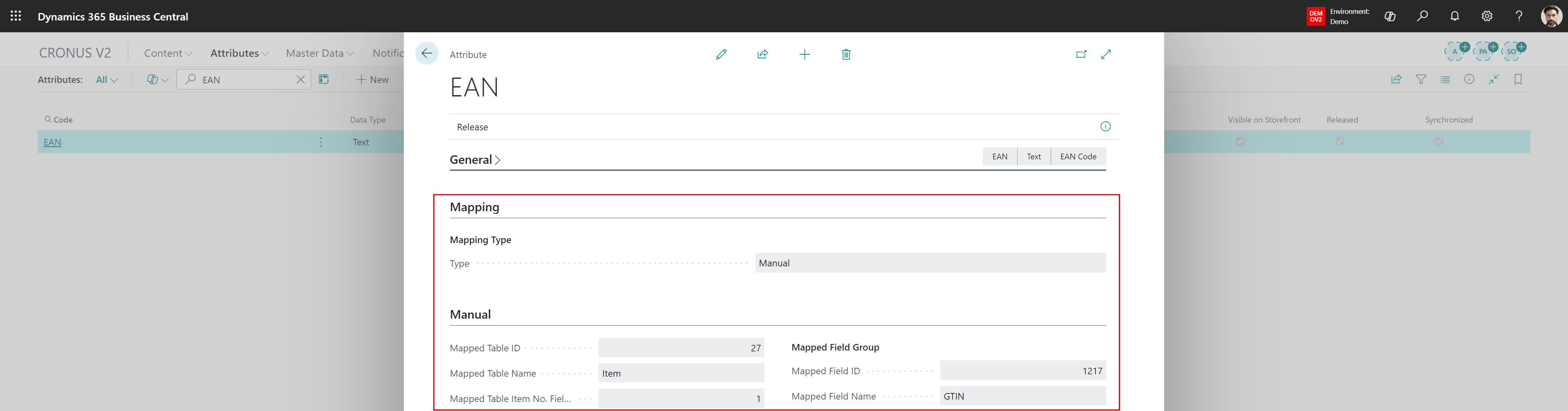
When looking for just a simple mapping where pointing at a table number and field is sufficient, you could use a Manual mapping, like mapping the EAN/GTIN field in the example below.
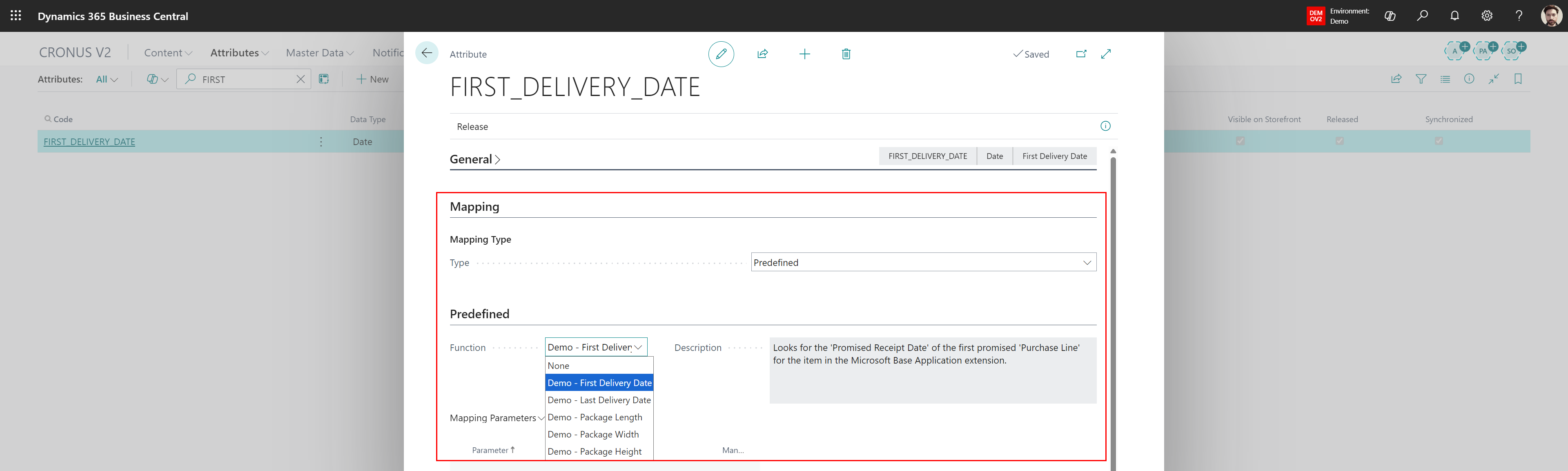
But if you need more flexibility or if you just prefer to code your mapping, then look for the Predefined type. In the example below you see an item attribute FIRST_DELIVERY_DATE which is assigned a predefined mapping.
Your codeunit must implement this interface:
interface "NC365 Predefined Mapping V2"
{
    procedure GetMappedTableNo(): Integer
    procedure GetMappedFieldNo(): Integer
    procedure GetDescription(): Text[250]
    procedure GetAllowedDataTypes(): List of [Enum "NC365 Attribute Data Type"]
    procedure GetAvailableParameterCodes(): Dictionary of [Code[50], Boolean]
    procedure GetValue(ItemNo: Code[20]; VariantCode: Code[20]; Parameters: Dictionary of [Code[50], Text]): Variant
}
You need two objects in your extension.
Create a codeunit that implements NC365 Predefined Mapping V2 and contains your custom mapping logic, like the example below:
codeunit 50020 "NC365D First Delivery Date" implements "NC365 Predefined Mapping V2"
{
    procedure GetMappedTableNo(): Integer
    begin
        exit(Database::"Purchase Line");
    end;


    procedure GetMappedFieldNo(): Integer
    begin
        exit(5791);
    end;


    procedure GetDescription(): Text[250]
    begin
        exit('Looks for the ''Promised Receipt Date'' of the first promised ''Purchase Line'' for the item in the Microsoft Base Application extension.');
    end;


    procedure GetAllowedDataTypes(): List of [Enum "NC365 Attribute Data Type"]
    var
        AllowedDataTypes: List of [Enum "NC365 Attribute Data Type"];
    begin
        AllowedDataTypes.Add(Enum::"NC365 Attribute Data Type"::Text);
        AllowedDataTypes.Add(Enum::"NC365 Attribute Data Type"::Date);
        exit(AllowedDataTypes);
    end;


    procedure GetAvailableParameterCodes(): Dictionary of [Code[50], Boolean]
    begin
    end;


    procedure GetValue(ItemNo: Code[20]; VariantCode: Code[20]; Parameters: Dictionary of [Code[50], Text]): Variant
    var
        Item: Record Item;
        PurchaseLine: Record "Purchase Line";
        UnitOfMeasure: Record "Unit of Measure";
        ItemUnitOfMeasure: Record "Item Unit of Measure";
    begin
        if not Item.Get(ItemNo) then
            exit;


        if (Item."Base Unit of Measure" <> '') or (Item."Sales Unit of Measure" <> '') then
            if Item."Sales Unit of Measure" <> '' then begin
                if UnitOfMeasure.Get(Item."Sales Unit of Measure") then;
            end else
                if UnitOfMeasure.Get(Item."Base Unit of Measure") then;


        PurchaseLine.SetRange(Type, PurchaseLine.Type::Item);
        PurchaseLine.SetRange("No.", ItemNo);
        if VariantCode <> '' then
            PurchaseLine.SetRange("Variant Code", VariantCode)
        else
            PurchaseLine.SetFilter("Variant Code", '%1', '');
        PurchaseLine.SetFilter("Promised Receipt Date", '>=%1', WorkDate());
        PurchaseLine.SetCurrentKey("Promised Receipt Date");
        PurchaseLine.Ascending(false);
        if PurchaseLine.FindFirst() then
            if ItemUnitOfMeasure.Get(ItemNo, UnitOfMeasure.Code) then
                exit(StrSubstNo('%1', Format(PurchaseLine."Promised Receipt Date", 0, '<Day>-<Month>-<Year4>')));
    end;
}
Create an enum extension that extends NC365 Predef. Mapping Type V2 and maps your new value to your codeunit:
enumextension 50010 "NC365D Mapping Type" extends "NC365 Predef. Mapping Type V2"
{
    value(50010; "NC365D First Delivery Date")
    {
        Caption = 'Demo - First Delivery Date';
        Implementation = "NC365 Predefined Mapping V2" = "NC365D First Delivery Date";
    }
}
Was this article helpful?
That’s Great!
Thank you for your feedback
Sorry! We couldn't be helpful
Thank you for your feedback
Feedback sent
We appreciate your effort and will try to fix the article